AWS Public Access Misconfiguration - Auto-remediate
This Playbook is part of the Cloud Security Posture Management Playbooks Pack.#
Supported versions
Supported Cortex XSOAR versions: 8.0.0 and later.
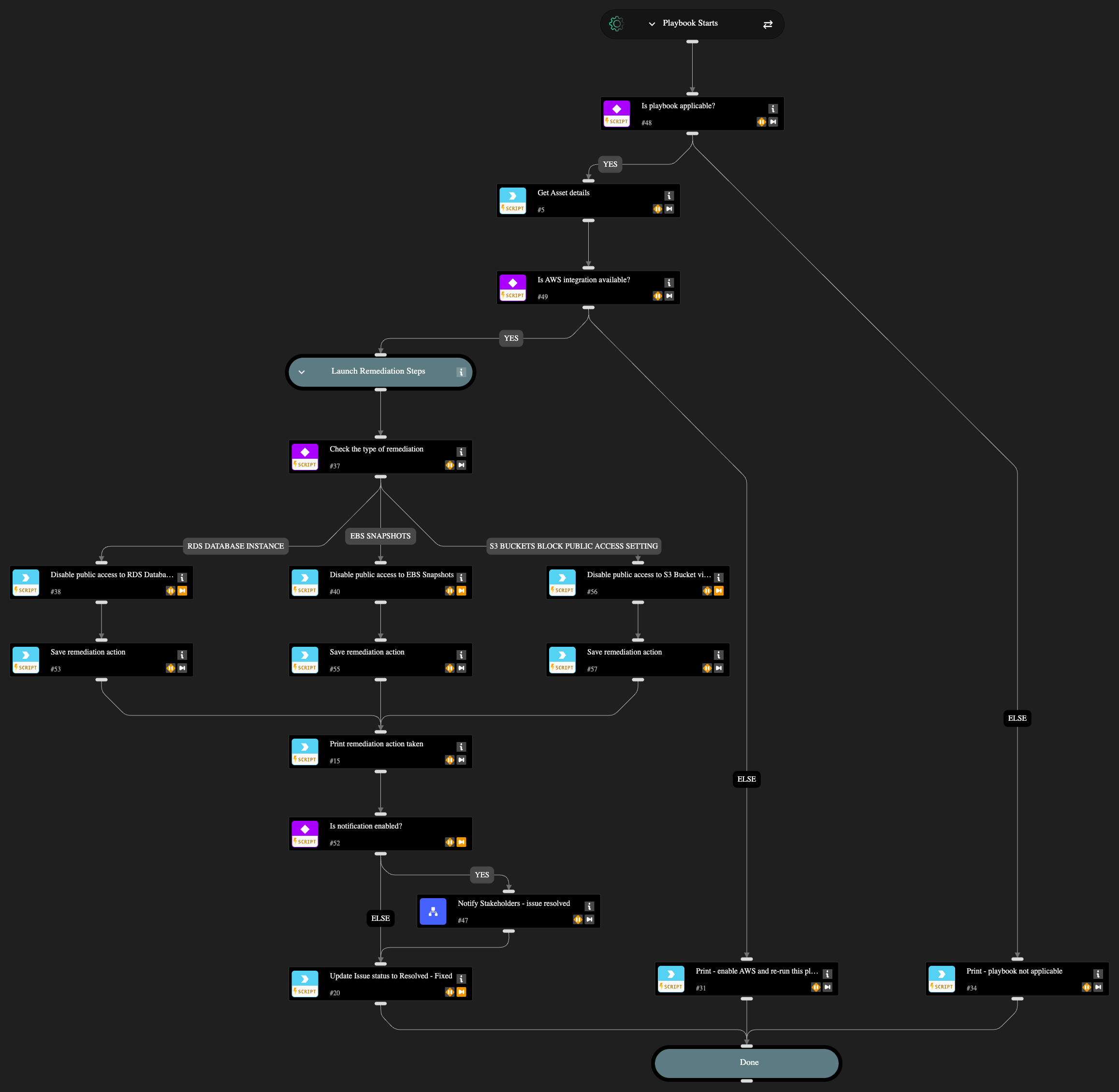
Automatically remediates 9 AWS public access misconfigurations: 1 RDS database, 1 EBS snapshot, and 7 S3 bucket issues:
- AWS RDS database instance is publicly accessible
- AWS EBS snapshots are accessible to public
- AWS S3 buckets are accessible to public via ACL
- AWS S3 Buckets Block public access setting disabled
- AWS CloudTrail bucket is publicly accessible
- AWS Connect instance using publicly accessible S3 bucket
- AWS S3 bucket policy overly permissive to any principal
- AWS S3 bucket publicly readable
- AWS S3 bucket publicly writable
The playbook disables public access by modifying RDS publicly_accessible settings, removing EBS snapshot createVolumePermission, and enabling S3 PublicAccessBlockConfiguration respectively.
Optional stakeholder notification is available via the "Notify Stakeholders" sub-playbook by setting enableNotifications input to 'yes' (default: 'no'). When enabled, configure at least one recipient (email, Slack channel, or Teams channel) in the Notify Stakeholders playbook inputs. The playbook automatically updates the issue status to "Resolved - Fixed" upon successful remediation.
Dependencies#
This playbook uses the following sub-playbooks, integrations, and scripts.
Sub-playbooks#
- Notify Stakeholders
Integrations#
- AWS
- Cortex Core - Platform
Scripts#
- Set
Commands#
- aws-ec2-snapshot-attribute-modify
- aws-rds-db-instance-modify
- aws-s3-public-access-block-update
- core-get-asset-details
- setIssueStatus
Playbook Inputs#
| Name | Description | Default Value | Required |
|---|---|---|---|
| enableNotifications | Options: yes/no Choose if you wish to notify stakeholders about the remediation actions taken. The recipients need to be configured in the Playbook Triggered header of the "Notify Stakeholders" sub-playbook. If no recipients are provided, the playbook will pause to ask for an input. | no | Required |
Playbook Outputs#
There are no outputs for this playbook.
Playbook Image#